Get a Video Gap Analysis for your company · See which videos could have the biggest pipeline impact
See Where Your Competitors Are Winning With Video Get a custom Video Gap Analysis for your company · See which videos could have the biggest pipeline impact
Thanks - our team will review your website and put together your personalized Video Gap Report. Expect it atthe email address you provided within 2 business days.
We'll put together a personalized report showing where video could have the biggest impact, how your competitors are using it, and specific opportunities for your team. You'll get strategic recommendations, not generic advice.
Thank you! Your submission has been received!
Oops! Something went wrong while submitting the form.
How to Build a Sales Enablement Content Library for SaaS Teams
Learn how to organize testimonials, case studies, reviews, and ROI data into a sales enablement content library your SaaS reps will use.
July 13, 2026
Your best customer stories are probably scattered across a dozen places right now. A strong case study lives in a marketing folder. A testimonial clip sits in someone's Google Drive. The ROI number a champion loved last quarter is buried in an old sales deck.
When a rep needs relevant customer evidence to move a deal forward, they either spend 20 minutes hunting for it or improvise with something weaker.
A sales enablement content library fixes that. It gives your SaaS sales team one organized place to find the exact case study, testimonial, review, quote, or ROI data a buyer needs at that point in the sales process.
This guide covers what to collect, how to organize it, where to store it, and how to keep it useful over time. It also explains why customer testimonial videos often become some of the most versatile assets in the library.
What Is a Sales Enablement Content Library?
A sales enablement content library is a centralized collection of resources that help sales reps educate buyers, answer objections, build confidence, and advance active deals.
Sales enablement can include content, tools, knowledge, training, and processes. A content library focuses on the assets reps need before, during, and after sales conversations.
Those assets may include:
Written case studies
Customer testimonial videos
Short testimonial clips
Customer quotes
Approved customer logos
Third-party ratings and reviews
ROI data
Benchmark statistics
Product comparison materials
Objection-handling content
Relevant product demos and explainers
A useful library includes both internal and external sales enablement content.
Internal content, such as sales playbooks, battle cards, email templates, and call scripts, helps reps prepare. External content, such as case studies, testimonials, ROI calculators, and customer-facing one-pagers, is shared directly with buyers.
This article focuses primarily on external sales enablement content built around real customer experiences and results.
Why SaaS Sales Teams Need an Organized Content Library
SaaS purchases often involve multiple stakeholders, longer evaluation periods, and buyers with different priorities.
A champion may understand the product but still need to build support with finance, IT, security, operations, or executive leadership. Each stakeholder may want different evidence before approving the purchase.
A generic case study may not be enough.
The CFO may want measurable ROI. The IT lead may want reassurance about implementation. The department head may care about adoption and workflow improvements. The executive sponsor may want to see how a similar company reduced risk or improved performance.
Customer references and reviews can also influence whether software buyers feel confident moving forward. G2 has reported that missing customer references and reviews are among the obstacles buyers face when evaluating software.
The problem is often not that the content does not exist. It is that reps cannot quickly find the right asset for the deal in front of them.
A well-organized sales enablement content library helps create:
Faster follow-up after sales calls
More relevant communication
Stronger internal support for buyer champions
More consistent messaging across the sales team
Better use of the customer stories marketing already produced
Clearer insight into which content supports closed deals
The goal is not to collect as much content as possible. The goal is to make the right content easy to find and use.
Sales Enablement Content Library vs. a Case Studies Page
A public case studies page and an internal sales enablement content library can contain many of the same assets, but they serve different purposes.
A case studies page is built for website visitors. It supports content marketing, organic search, brand credibility, and broad buyer education.
A sales enablement content library is built for retrieval during active deals. It helps reps quickly find a specific customer story, quote, metric, or video that matches the buyer's industry, role, pain point, or stage in the sales process.
A public page may organize stories by customer name or feature the most impressive brands first.
An internal library should organize them around the way reps actually search:
Industry
Company size
Buyer role
Use case
Product or feature
Business challenge
Measurable outcome
Sales stage
Common objection
A rep is rarely thinking, "I need the Acme case study."
They are more likely thinking, "I need a healthcare customer story that addresses implementation concerns and includes a measurable time-saving result."
Strong sales and marketing teams maintain both. Public pages help buyers discover customer stories, while the internal library helps sales teams deploy those stories strategically.
For inspiration on how customer content can be presented publicly, review these testimonial page examples.
Types of Sales Enablement Content Worth Collecting
A useful library includes a mix of formats. Different buyers respond to different types of evidence, and each stage of the sales process creates a different need.
Written case studies are flexible, easy to skim, and easy for a buyer champion to forward internally.
A strong case study should explain:
Who the customer is
What problem they faced
Why they chose the solution
How implementation worked
What changed afterward
Which measurable results they achieved
Specificity matters. "The team was great" is positive feedback, but it does not give a buyer much reason to act.
A stronger story explains what improved, how long it took, and why the result mattered.
Video Testimonials and Customer Story Videos
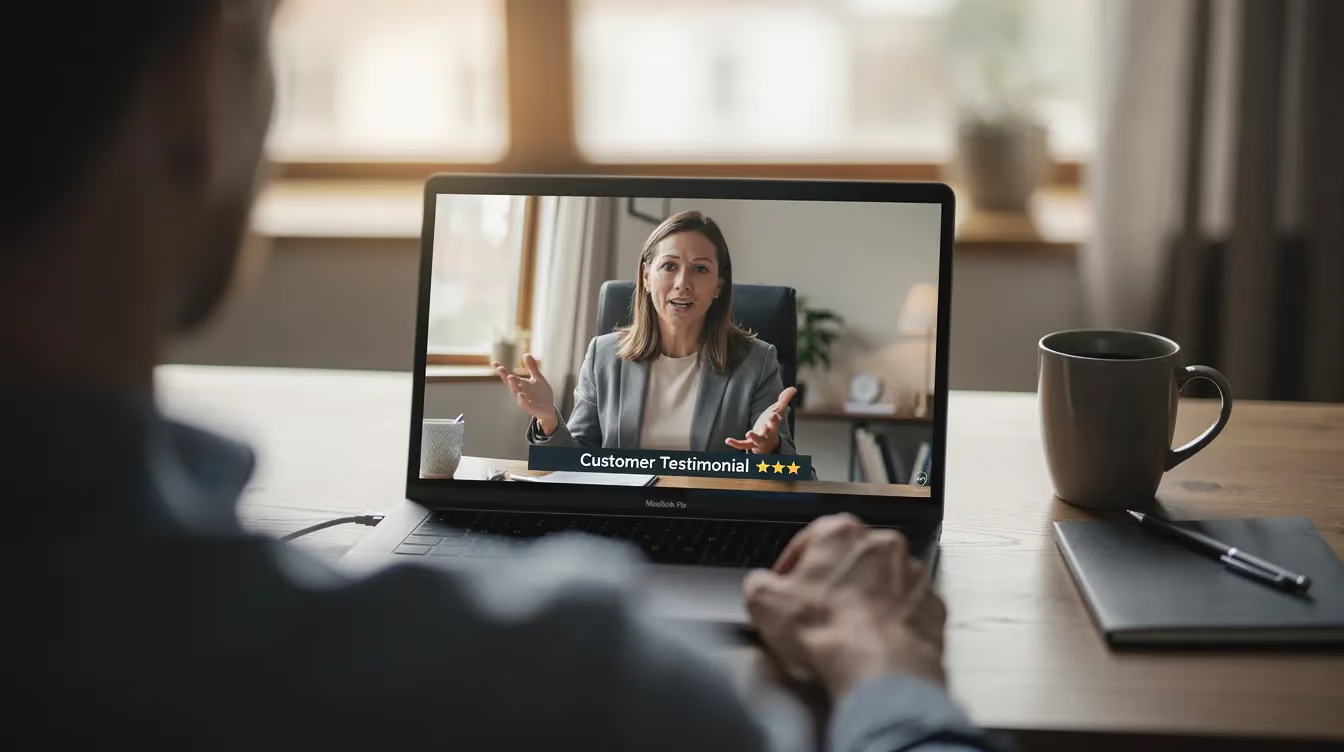
Video testimonials let buyers see and hear a real customer describe their experience. Voice, expression, delivery, and specific details add context that a written quote cannot fully capture.
Store multiple versions when possible:
A two- to three-minute customer story for later-stage sales conversations
A 60- to 90-second testimonial for landing pages and follow-up emails
A 15- to 30-second clip addressing one result or objection
A vertical version for social media
Quote graphics or written excerpts pulled from the interview
The strongest videos focus on a clear problem, a credible outcome, and details that matter to the intended buyer.
Use SaaS customer testimonial questions that uncover information about onboarding, adoption, workflow changes, time-to-value, and ROI instead of settling for broad praise.
Quotable Lines and Pull Quotes
A buyer does not always need a full case study.
A strong, approved customer quote can support:
A sales presentation
A follow-up email
A proposal
An executive summary
A comparison document
An account-specific landing page
A digital sales room
Pull the best lines from interviews and case studies, then store them separately with the customer's name, title, company, use case, and approval status.
This saves reps from searching through long transcripts or PDFs during an active deal.
Customer Logos and Review Ratings
Customer logos and third-party review ratings provide fast trust signals, especially near the beginning of the sales process.
Keep a current folder of:
Approved customer logos
Current review platform ratings
Approved badges
Customer counts
Industry-specific logo groups
Screenshots with the date captured
Include usage rules so reps know which logos can be used publicly, privately, or only in specific contexts.
ROI Statistics and Outcome Data
Specific results help buyer champions justify the investment internally.
Useful examples include:
Time saved
Revenue generated
Costs reduced
Productivity improved
Adoption rates
Implementation time
Error reduction
Faster reporting
Shorter sales cycles
Reduced downtime
Every statistic should include enough context to prevent misuse.
A rep should be able to see:
Which customer produced the result
Which product or service was involved
The customer's industry and company size
The timeframe
Whether the number is approved for external use
Any limitations or qualifying details
A percentage without context may sound impressive, but it can create credibility problems if the buyer asks how it was calculated.
Objection-Handling Stories
Some of the most valuable sales enablement content directly addresses common concerns.
Tag customer stories that speak to questions such as:
Was implementation difficult?
How quickly did the team see value?
Did employees actually adopt the platform?
How responsive was support?
Was the product worth the investment?
Did it integrate with existing systems?
What concerns did the customer have before purchasing?
Why did they choose this solution over alternatives?
A customer who openly explains an early concern and what changed afterward can be more persuasive than a story that sounds positive from beginning to end.
How to Organize Sales Enablement Content
Collecting assets is the easy part. The value comes from organizing them around how sales reps think during live opportunities.
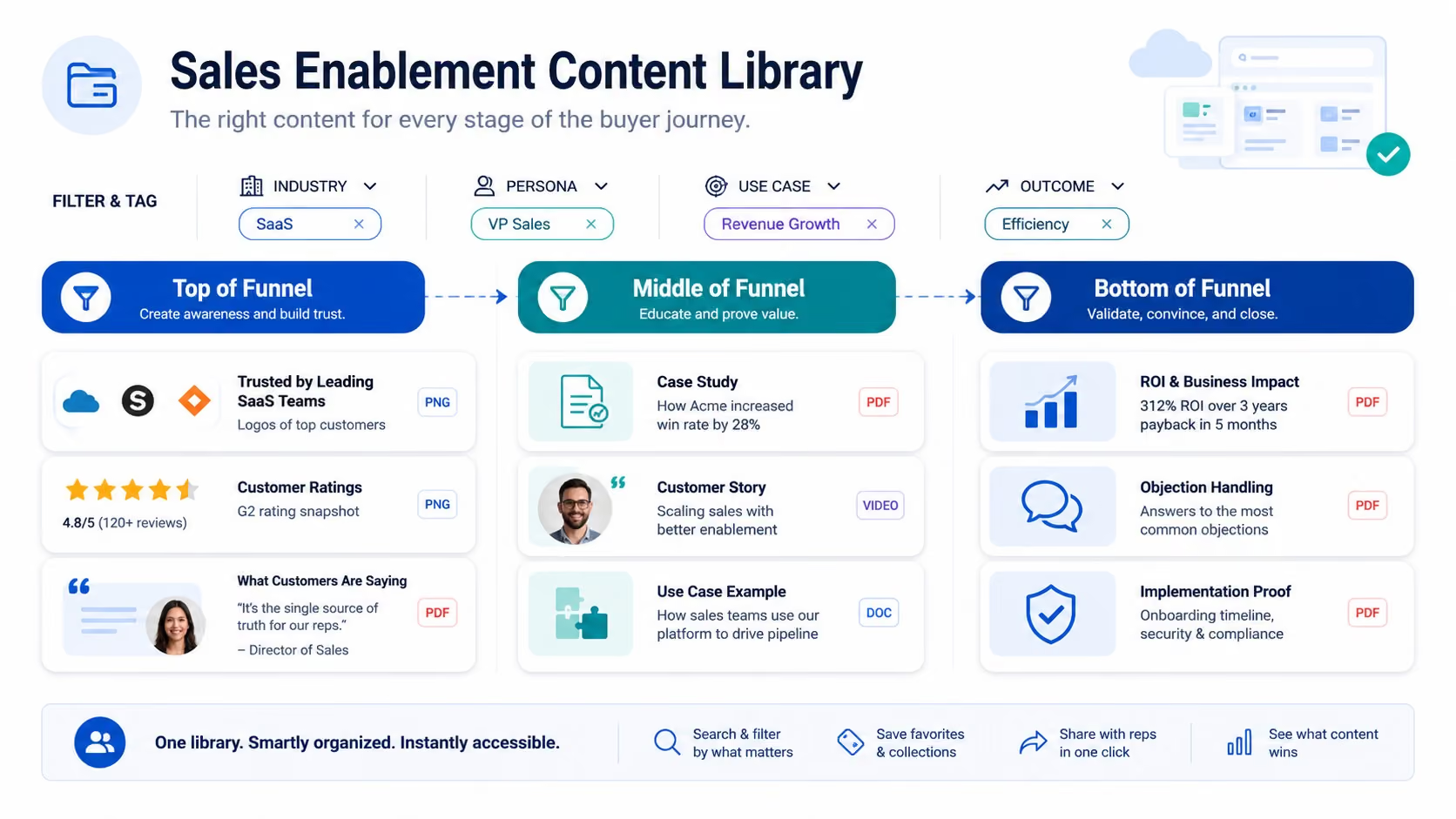
Start with the buyer stage, then add filters for industry, use case, persona, objection, and result.
Top of Funnel: Fast Trust Signals
Early-stage buyers are still deciding whether your company deserves serious consideration.
Useful content includes:
Recognizable customer logos
Review ratings
Short testimonial clips
Brief customer quotes
Industry-specific customer lists
One-page success snapshots
These assets answer a basic question: Have companies like mine trusted this solution?
Keep them easy to access for prospecting, introductory emails, landing pages, and first sales calls.
Middle of Funnel: Relevant Customer Stories
During evaluation, buyers need evidence that the product works in situations similar to theirs.
Useful content includes:
Industry-specific case studies
Role-matched testimonials
Product or use-case stories
Customer story videos
Implementation examples
Before-and-after workflow examples
A generic customer story may be credible, but a closely matched story is more useful.
A healthcare operations leader is more likely to respond to a healthcare workflow story than a general SaaS testimonial. A CFO may care more about ROI than feature adoption. A technical buyer may want evidence about implementation and integration.
Organize assets according to these differences.
Bottom of Funnel: Justification and Risk Reduction
Later-stage buyers are often working through approval, procurement, budget, risk, and internal alignment.
Useful content includes:
Detailed ROI case studies
Customer quotes addressing specific objections
Implementation stories
Security or compliance references
Executive testimonials
Customer references approved for direct contact
Industry-specific results
Comparison materials
Videos featuring similar buyer roles
This is also where buyers may share content internally with stakeholders who never attended the original sales call.
Make sure the asset can stand on its own. A customer story should still make sense when forwarded to finance, IT, or leadership without the sales rep there to explain it.
Tag Content the Way Reps Actually Search
File names such as "Final_CaseStudy_V7.pdf" do not help anyone.
Use plain-language labels that explain what the asset proves and who it is relevant to.
For example:
Healthcare | Reduced administrative time | Operations leader | ROI
The tradeoff is cost and setup time. A sophisticated platform still needs clear ownership, tagging, and governance.
Shared Drive or Internal Wiki
Smaller teams can start with a well-structured shared drive, Notion workspace, SharePoint library, or internal wiki.
Create a consistent folder structure and naming system. Add a searchable index or spreadsheet if the platform's search is limited.
A simple library can work well when:
The number of assets is manageable
Reps know where to look
Tags and file names are consistent
One person owns maintenance
Outdated versions are removed
Permissions are clearly documented
Do not delay the project because you do not have a dedicated platform. Organization and adoption matter more than software during the early stages.
Link Assets Directly to Deal Records
Wherever the library lives, connect relevant content to the active opportunity whenever possible.
A rep should not need to restart the search every time they return to a deal.
Attach or link the most relevant assets inside:
CRM opportunity records
Account plans
Digital sales rooms
Shared buyer workspaces
Follow-up email templates
Proposal templates
Sales sequences
Internal deal notes
This turns the library into part of the sales workflow instead of another destination reps have to remember.
How Reps Use the Library During Active Deals
Most sales content advice focuses on what to create. The harder question is what happens when a rep needs an asset in the next 10 minutes.
If retrieval takes too long, reps will skip the library and improvise.
Make the process simple enough that a rep can answer these questions quickly:
Do we have a story from this industry?
Do we have a customer with the same job title?
Is there a testimonial that discusses implementation?
Do we have a credible ROI number?
Is there a short clip I can include in a follow-up email?
Can I use this logo or quote?
Is this asset still current?
Build content into the tools reps already use.
You can also create a brief "which content to use when" guide that maps common sales situations to recommended assets.
For example:
New prospect in a familiar industry: Send an industry-specific case study.
Champion needs executive approval: Send a concise ROI story and executive testimonial.
Buyer is worried about implementation: Send a customer clip addressing onboarding and rollout.
Prospect has gone quiet: Send a short, highly relevant customer example instead of another generic follow-up.
Buyer asks whether the platform works at scale: Send an enterprise case study with company size, use case, and measurable outcomes.
The less searching a rep has to do, the more likely your strongest customer stories are to appear in real sales conversations.
Track Customer Approvals and Usage Rights
Every customer story, quote, logo, result, and testimonial should include clear usage information.
Store details such as:
Whether the asset is approved
Whether the customer's full name can be used
Whether the company name and logo can appear
Whether the content can be used publicly
Whether it can be shared privately in sales conversations
Whether paid advertising is permitted
Whether the customer approved edited clips
When permission should be reviewed again
Who owns the relationship with the customer
Approval for one case study does not automatically mean every quote or clip can be used in every channel.
Clear documentation protects the customer relationship and helps reps use content confidently.
How to Keep the Library Current
A sales enablement content library is a living resource. Products change, customers churn, metrics become outdated, and messaging evolves.
A library that reps do not trust will stop getting used.
Set a Review Cadence
A quarterly review works for many SaaS teams.
During each review:
Remove or archive outdated assets
Confirm that featured customers are still active
Update product names and screenshots
Review customer permissions
Refresh changing statistics
Add recent wins
Identify gaps by industry, use case, and persona
Review which assets are being used
Flag content that no longer reflects current positioning
Evergreen testimonial videos may stay useful for years, but they should still be reviewed periodically.
Assign One Clear Owner
Shared ownership often leads to inconsistent maintenance.
Assign one person who is responsible for:
Organizing the library
Managing tags and naming conventions
Tracking approvals
Removing outdated versions
Gathering sales feedback
Identifying missing stories
Coordinating new asset production
Reporting on usage
The owner may sit in customer marketing, product marketing, sales enablement, content marketing, or revenue operations.
The department matters less than the accountability.
Build a Repeatable Customer Story Pipeline
Do not wait until the library feels empty to start asking customers for stories.
Create a repeatable process for identifying strong candidates.
Good moments to ask include:
After a measurable result
Following a successful launch
After a positive renewal conversation
When a customer gives enthusiastic feedback
After an expansion
Following a successful support interaction
When the sales team identifies a missing industry or use case
Use a clear, low-friction request. This guide on how to ask for a testimonial includes email templates and scripts that make the process easier.
How to Measure Whether the Library Is Working
You do not need a complex attribution model to evaluate the library.
Start with three areas.
Adoption
Track whether reps are using the content.
Look at:
Searches
Downloads
Shares
Assets added to opportunities
Reps using the library
Most frequently used content
Content that is never used
Low usage may indicate a findability or training problem rather than a lack of useful content.
Buyer Engagement
Where possible, use trackable links or shared workspaces to measure:
Opens
Video views
Watch time
Repeat views
Internal sharing
Downloads
Engagement by buyer role
A case study that gets forwarded internally may be doing valuable work even if it does not generate an immediate reply.
Revenue Influence
Track which content appears in:
Closed-won opportunities
Faster-moving opportunities
Larger deals
Deals with multiple stakeholders
Deals where a specific objection was resolved
Accounts that moved forward after viewing a testimonial
The goal is not to claim that one video or case study closed the deal by itself.
The goal is to understand which assets consistently help reps create confidence, answer questions, and maintain momentum.
Why Video Testimonials Strengthen a Sales Enablement Content Library
Written case studies, review ratings, customer quotes, and ROI data all serve important roles.
Video testimonials often become especially valuable because one well-planned customer interview can produce many different assets.
A single interview can become:
A full customer story video
Several objection-specific clips
A short sales follow-up video
Website content
Social media edits
Pull quotes
Written case study material
Presentation content
Proposal inserts
Industry-specific landing page content
The interview also captures details that may never appear in a standard written survey.
A strong interviewer can uncover:
The concern that nearly stopped the purchase
The moment the customer realized the product was working
The result that mattered most internally
The reason one stakeholder became an advocate
The operational change behind the headline metric
The customer's advice for a buyer considering the same decision
The format should match the intended use.
Remote testimonial production may be the right choice when customers are geographically dispersed, timelines are tight, or the company needs to collect stories at scale.
On-site production may be better when the environment, product, people, or supporting footage strengthens the story.
Turn Customer Stories Into Sales Enablement Content Reps Will Use
A sales enablement content library is only as strong as the stories inside it.
Start by organizing the useful content you already have. Identify the industries, personas, use cases, objections, and outcomes that are underrepresented. Then build a repeatable process for creating the customer stories your sales team needs most.
CaseLeap produces B2B customer testimonial videos designed for use across sales, marketing, websites, presentations, and customer campaigns.
Talk to the CaseLeap team about building a stronger library of customer stories your sales team can actually use.
FAQs
What is sales enablement content?
Sales enablement content includes the resources sales reps use to educate buyers, answer questions, overcome objections, and advance deals. It may include internal resources such as playbooks and battle cards, as well as buyer-facing assets such as case studies, testimonial videos, ROI calculators, comparison guides, and product demos.
What should be included in a sales enablement content library?
A sales enablement content library may include written case studies, testimonial videos, short clips, customer quotes, logos, review ratings, ROI statistics, benchmark data, product materials, objection-handling stories, and customer-facing sales collateral.
How should sales enablement content be organized?
Organize content around the way reps search during active deals. Useful filters include buyer stage, industry, company size, persona, use case, pain point, objection, measurable outcome, product, content format, and approval status.
Where should a SaaS company store sales enablement content?
Smaller teams may use a shared drive, internal wiki, Notion workspace, or SharePoint library. Larger teams may use a dedicated sales enablement platform or connect content directly to the CRM. The best option is the one that makes approved content easy for reps to find inside their existing workflow.
How often should a sales enablement content library be updated?
Most teams should review the library quarterly. Remove outdated assets, refresh statistics, confirm customer permissions, add recent wins, and identify gaps in industries, buyer roles, use cases, and common objections.
Who should own the sales enablement content library?
Assign one clear owner in customer marketing, product marketing, sales enablement, content marketing, or revenue operations. That person should manage organization, permissions, updates, sales feedback, content gaps, and performance reporting.
How can video testimonials be used in sales enablement?
Video testimonials can be shared in follow-up emails, presentations, proposals, landing pages, digital sales rooms, procurement conversations, and account-specific campaigns. A single interview can also produce shorter clips, written quotes, case study content, and social edits.
Build trust and accelerate conversions
Contact us today. We'd love to help you supercharge your sales conversions.