Get a Video Gap Analysis for your company · See which videos could have the biggest pipeline impact
See Where Your Competitors Are Winning With Video Get a custom Video Gap Analysis for your company · See which videos could have the biggest pipeline impact
Thanks - our team will review your website and put together your personalized Video Gap Report. Expect it atthe email address you provided within 2 business days.
We'll put together a personalized report showing where video could have the biggest impact, how your competitors are using it, and specific opportunities for your team. You'll get strategic recommendations, not generic advice.
Thank you! Your submission has been received!
Oops! Something went wrong while submitting the form.
How to Repurpose Testimonial Videos: 25 Ways to Maximize Your Investment
Turn one testimonial video into 25 high-value assets for sales, social, web, ads, events, and more.
July 7, 2026
How to Repurpose Testimonial Videos: 25 Ways to Maximize Your Investment
You filmed the testimonial. Your customer told a great story, the video looked sharp, and then it ran on one landing page and got shared once on LinkedIn.
Now it sits in a folder.
And that is a budget leak most marketing teams never talk about. Customer testimonials are hard to get. They take coordination, legal sign-off, and real production investment. Treating that footage as a single deliverable means leaving serious ROI on the table.
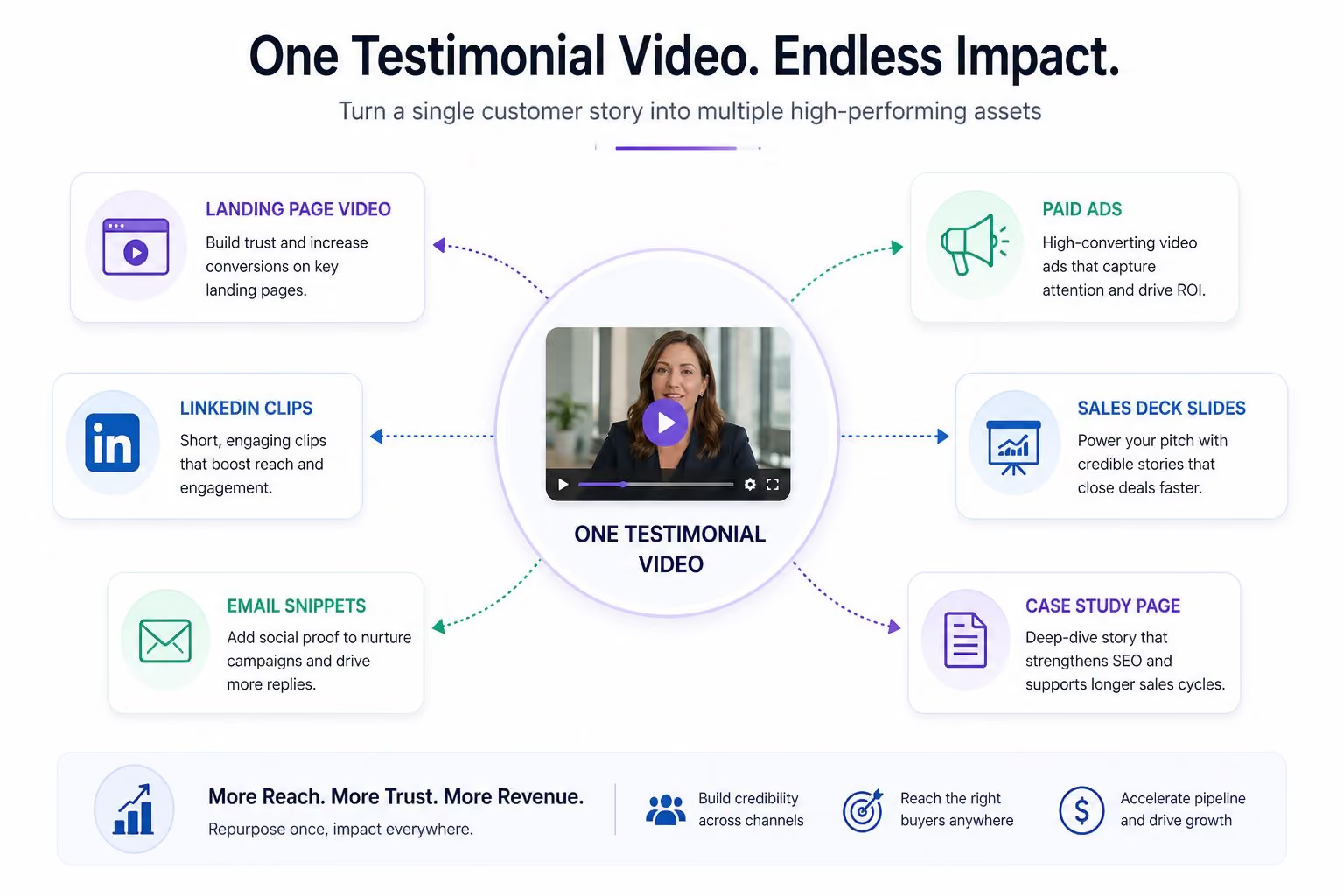
A single testimonial video can generate 20 or more pieces of repurposed content without a new shoot. That original video becomes clips for social media, sales assets, website embeds, and more.
This blog covers 25 specific ways to repurpose testimonial videos across sales, website, social, demand gen, events, and internal teams.
Why Repurposing Testimonial Videos Is a Budget Decision, Not a Content Decision
Customer proof is harder to get than any other video content you produce. A blog post takes a few hours. A testimonial takes a willing customer, scheduling, legal approval, and a full production day.
When that footage only powers one campaign, your cost-per-asset is brutal.
Video repurposing changes that math completely. One video becomes new content across every channel your target audience already uses. A single 2-3 minute customer interview can generate short clips for sales, social posts, website embeds, paid ads, event reels, and internal enablement content.
The business impact is real. Teams with a strong testimonial video content strategy report faster deal velocity, higher opportunity-to-close rates, and stronger performance on high-intent pages compared to teams treating testimonials as one-off assets. Video marketing is one of the most powerful tools available for driving engagement and building trust, and repurposing makes that investment go further.
The other thing most teams miss is shelf life. A testimonial produced today does not expire after one campaign. With the right repurposing plan, that same customer story supports pipeline across multiple quarters and reaches new audiences every time it shows up in a new format or channel.
That is maximizing testimonial video ROI. Not spending more. Getting more mileage from original video content you already own. That is how testimonials stay relevant long after the initial campaign ends.
Sales Enablement: 5 Ways to Turn Testimonials Into Deal-Closing Assets
Modern B2B sales cycles run on peer proof. But most sales reps go into deals without the right testimonial format for the right moment. They have the full video but not the 45-second clip that speaks directly to the prospect's biggest concern.
1. Objection-handling clips
Cut 30-45 second clips mapped to specific buyer concerns like security risk, integration complexity, or time to value. When a prospect raises an objection, your rep sends a clip of a real customer addressing that exact pain. That is more convincing than anything in a slide deck.
2. Vertical-specific cuts
Pull a short version of a longer video tailored to a specific industry. A healthcare CIO is far more likely to engage with a clip featuring another healthcare CIO than a generic customer story.
3. Persona-based reels
Stitch multiple short clips together for a specific role. CFOs care about cost and ROI. CTOs care about integration and security. Operations leaders care about implementation speed. Build a reel for each.
4. Competitive takeout clips
Cut a 60-second "why we switched" version from existing footage. Let your customer explain the decision in their own words. That is your most credible competitive asset.
5. Email-friendly clips
Trim existing video content down to under 60 seconds for outbound sequences and post-demo follow ups. Short videos in email marketing campaigns consistently outperform text-only messages on click-through and reply rate. These are some of the most practical different formats you can create from existing content.
To make this work at scale, tag your footage by topic, industry, and persona so reps can find the right clip in just minutes. Deploy these assets inside sales decks, live demos, and email marketing tools like Outreach or Salesloft. Video testimonials used this way become a powerful marketing tool for your entire revenue team.
Website Placement: 5 Ways to Build a High-Conversion Proof Layer
Most companies have one Customer Stories page and call it done. Meanwhile their highest-intent website pages have no video testimonials at all. That is the wrong approach.
High-intent pages are where purchase decisions actually happen. Your pricing page, your product pages, your solution pages. Those are the places where a real customer voice carries the most weight. Burying testimonials in one corner of your site means the people closest to buying never see them.
Here are five ways to weave existing video content into your site where it actually moves the needle.
6. Homepage proof
Place a looped, silent testimonial montage at or just below the fold. Visitors form an impression of your brand in seconds. A real customer face and a clear outcome metric does more work than any headline you can write.
7. Product and solution pages
Map 30-60 second clips to specific outcomes. A clip showing "reduced onboarding time by 40%" on your implementation page speaks directly to the concern that buyer already has. Specific beats generic every time.
8. Industry and vertical pages
Build curated playlists of sector-specific customer stories. Healthcare buyers want to hear from healthcare customers. SaaS buyers want to see SaaS results. Match the story to the audience on the page.
9. Pricing page reassurance
Short clips addressing risk, implementation concerns, or support quality placed near your CTA buttons reduce friction at the moment of highest intent. This is where social proof does its heaviest lifting.
10. Resource and case study pages
Combine the full testimonial video, a written case study, and short highlight reels in one place. Buyers who want depth get depth. Buyers who want a quick answer get that too.
Repurposing here is mostly about smart editing and placement. Turn videos into short clips, add captions, and embed them where purchase intent is highest. This kind of video repurposing does not require new content. It requires better use of original content you already have.
Social Media: 6 Ways to Atomize Testimonials for Every Network
Social media platforms are the easiest place to repurpose testimonial videos. It is also where most teams do the least strategic thinking about video repurposing.
They clip something, post it everywhere in the same format, and wonder why it underperforms. Different platforms have different native behaviors. What works on LinkedIn does not work on Instagram. What works on Instagram does not work on YouTube Shorts.
Here are six ways to turn existing footage into social content that actually fits where it lives.
11. LinkedIn clips
Cut 15-30 second clips built around one quote and one measurable outcome. These bite sized videos perform well as LinkedIn posts when formatted at 1:1 or 4:5 ratio with burned-in captions. Most LinkedIn users scroll without sound. If your message only works with audio, most people will never hear it.
12. Instagram Reels and YouTube Shorts
Pull vertical soundbites from longer videos and lead with a strong hook in the first two seconds. Attention on these platforms is decided almost instantly. If the opening does not grab, the rest does not matter.
13. Multi-slide Stories
Use a short video moment or still frame per slide with an overlaid quote and metric. Stories work well for building a quick narrative arc around a single customer result.
14. Carousel posts
Build carousels from stills, behind-the-scenes shots, and transcript excerpts. End with a clear prompt linking to the full testimonial. Carousels drive strong audience engagement on LinkedIn and Instagram because they reward curiosity. They also work well for brand storytelling across different formats.
15. Social proof compilations
Cut a 30-45 second montage of 5-7 micro clips around one theme. Implementation speed. Time to value. Support quality. A compilation hitting one clear message from multiple customers is more persuasive than any single voice.
16. Waveform quote graphics
Turn audio snippets into waveform-style visuals for audio-friendly posts or social video ads. These work especially well as paid social creative when you want something that feels organic rather than produced.
Tailor length and aspect ratio for each platform. Add captions to everything. Always include UTMs in your captions or links so you know which clips are actually driving demo requests and which are just collecting views. Creating clips tailored to each platform is what turns viewers into actual pipeline.
Demand Generation: 5 Ways to Use Testimonials to Fuel Pipeline
Testimonial videos are some of the highest-converting assets in paid and lifecycle campaigns. Most teams underuse them here because they think of customer video as brand content rather than a demand generation tool.
Here are five ways to put existing footage to work across your demand gen programs.
17. Mid-funnel paid social ads
Cut 15-30 second proof clips aligned to a specific campaign theme or ICP. A testimonial from a healthcare CFO talking about ROI will outperform a generic feature ad every time when you are targeting healthcare CFOs. Match the story to the audience you are paying to reach.
18. Retargeting ads
Show testimonial snippets specifically to visitors who already hit your high-intent pages. Someone who spent time on your pricing page or integration docs is already interested. A short customer clip addressing their likely concern is exactly the right message at exactly the right moment.
19. Nurture email series
Build an email sequence where each send highlights a different customer segment or outcome. Short video plus a one-paragraph summary. Keep it focused on one result per email. Each send gives your target audience valuable information without feeling repetitive. This approach keeps your nurture content feeling fresh across a long sequence without producing anything new.
20. ABM plays
Cut custom versions with text overlays that call out a specific vertical or named account list. Personalization does not always require a new shoot. Sometimes it just requires a different title card and a clip that already speaks to that industry. You are not producing same content for every segment. You are producing relevant content from the same source.
21. Mid-funnel landing pages
Pair a full testimonial video with key quotes and supporting stats on landing pages built around gated assets or demo CTAs. Buyers at this stage are evaluating. Giving them a real customer story at the moment they are deciding whether to raise their hand is one of the highest-leverage moves in demand generation.
A/B test testimonial-led ads against feature-led ads. Test different customer stories against different audience segments. The data will tell you which combination drives the most demos and SQLs. Then double down on what converts.
Events and Presentations: 4 Ways to Bring Customer Voices Into the Room
Most event presentations rely on secondhand customer stories. A sales leader quotes a client's win from memory. A marketer puts a logo on a slide and calls it social proof.
A short, well-placed customer clip does more in 60 seconds than either of those approaches. Video testimonials used this way give your presentations more value and immediate credibility.
Here are four ways to put customer video to work at your next event.
22. Keynote openers
Start a conference session or sales kickoff with a 60-90 second clip of a real customer describing the problem your product solves. It sets the stakes immediately and grounds everything that follows in a real outcome rather than a vendor claim.
23. Chapter-break videos
Insert short clips between agenda sections in live or virtual events to reset attention. Audiences tune out during transitions. A customer voice is one of the fastest ways to pull them back in before the next speaker or segment.
24. Booth reels
Loop a 2-3 minute highlight reel of multiple customer clips at your event booth or sponsor lounge. Use big captions for muted environments. Keep it moving. People walking past a booth have about three seconds of attention to give before they keep walking.
25. Session-specific proof clips
Pull clips that match the exact theme of a webinar or workshop session. If you are running a session on implementation speed, find the customer clip where someone talks about going live in three weeks. Relevance is what makes these land.
Plan your edits and file formats well ahead of the event. The week before a conference is the wrong time to discover your video is the wrong aspect ratio for the venue screen.
Employee and Partner Enablement: Going Beyond Marketing
Testimonial videos are not just external assets. The same footage that convinces a prospect can do serious work inside your organization too.
Most teams never think about this.
Here is where it goes beyond marketing.
New hire onboarding
Short clips of customers explaining why they chose your product and what changed after they did give new employees something no internal document can. They hear directly from real customers about real outcomes. That shapes how a new hire thinks about the product from day one.
All-hands and team meetings
Use a customer clip to open a company all-hands or highlight a recent win in a team meeting. Hearing a customer describe the impact of your work in their own words does more for team morale and internal alignment than a slide full of metrics.
Partner enablement portals
Resellers and channel partners need proof too. Load your partner portal with testimonial clips relevant to each partner's verticals and solution areas. Give them content they can actually use in their own conversations.
Sales kickoffs and QBRs
Stitch together a short compilation that reinforces the strategic focus for the quarter. A new product line, a target vertical, a competitive displacement play. Customer voices make those priorities feel real rather than theoretical.
Internal learning
Let your support, product, and success teams hear customer pain points in their own words. No internal brief captures it the way a customer does when they describe the problem they had before your product existed.
Most of these uses require lighter editing. Remove sensitive pricing references, clean up any logos that should not appear in partner content, and make sure the usage rights from the original production cover internal distribution. Clean audio and clear framing from the original shoot make all of this seamless.
Content Atomization: How to Design Testimonial Videos for Repurposing From Day One
The single biggest factor in how many assets you can build from a testimonial is not what happens in post-production. It is what happens before the camera turns on.
Content atomization means planning each shoot so it naturally breaks into many smaller pieces. Here is what that looks like in practice.
Structure questions around clear chapters. Map your interview questions to distinct sections: the problem, the selection process, implementation, and results. Each answer stands alone as a usable clip.
Capture B-roll with repurposing in mind. Shoot product usage, team interactions, and environment footage. B-roll is what makes a short clip feel finished rather than raw.
Frame for both horizontal and vertical. Record with vertical-safe framing so social versions retain quality without awkward cropping.
Get permissions that cover everything. Collect releases covering multi-channel use across ads, website, events, and partner content for multiple years.
Capture micro-interviews and extra soundbites. Grab additional short takes while the customer is still on camera. These become hooks for future ads and social posts.
Align every shoot to a priority narrative. Identify one or two core messages before production starts. That thread is what makes atomized assets feel cohesive across channels.
Conclusion
Most marketing teams underinvest in distribution and overinvest in production. They spend real budget getting a customer on camera and then let that footage do one job.
That changes the moment you start treating footage as a library instead of a deliverable.
A single testimonial video can power your sales team's outreach, your highest-intent web pages, your paid campaigns, your event presentations, and your internal alignment. The footage does not change. The distribution strategy does.
Audit one testimonial you already own this week. Pick 10 formats from this list. Prioritize the two or three that would have the most impact on your pipeline next quarter and start there.
How many assets can you realistically get from one testimonial video?
Most B2B teams can build 15-25 assets from a single 2-3 minute testimonial. Short social clips, sales snippets, website embeds, ad versions, and internal cuts. The exact number depends on interview structure, B-roll captured, and how many audiences the story speaks to.
How do you measure ROI on repurposed testimonial videos?
Track influenced pipeline, win rate lift, and page engagement on assets featuring testimonials versus those without. Tag every derivative asset with UTMs and connect clips to demos and SQLs in your CRM. Qualitative signals matter too. If sales keeps sending the same clip because it closes deals, that counts.
What makes a testimonial video easier to repurpose?
Clean audio, clear framing, strong lighting, and chapter-based answers. Specific metrics, timelines, and before-and-after descriptions create stronger hooks. Planning for both horizontal and vertical framing from the start saves significant editing time later.
Can older testimonial videos still be repurposed?
Yes, if the story is accurate and positioning has not changed. Re-edit, update lower thirds, re-caption, and cut shorter clips for current campaigns. Verify usage permissions and check that any UI or branding shown is not outdated before reuse.
Should you use on-site or remote testimonials if repurposing video content is the goal?
Both work well. On-site provides richer B-roll and more visual variety for derivative assets. Remote is faster to schedule and still delivers strong clips for sales, social, and demand gen. Larger programs blend both: on-site testimonial for flagship stories and remote recording for scalable coverage.
Build trust and accelerate conversions
Contact us today. We'd love to help you supercharge your sales conversions.